
How to Create an Alumni Directory: A Simple Launch Guide
· By The Soorse Team
Alumni launch guide
Your alumni already share a school, experiences, and a reason to care about one another. An alumni directory gives those relationships somewhere to grow: a place to find a classmate, meet someone in your industry, support an alumni-owned business, or reconnect before a reunion.
Creating one can be straightforward. In Soorse, start with an alumni group, bring people in through a CSV import, email invitations, or a QR code, and give them something useful to do when they arrive. Member suggestions, connected event tools, and AI-assisted posts help you keep it moving. This guide walks through that launch, with product screenshots and a checklist you can save.
A simple first launch
One alumni group. One initial class or chapter. One welcome post. One upcoming event. Start there, then invite the wider network as members begin finding value.
Jump to the launch checklistWhat are the benefits of an alumni directory?
A useful directory makes the people behind your school community easier to find. Its value grows when those people reconnect, share experience, and have reasons to return.
- Keep relationships alive after graduation. Help graduates find classmates, reconnect across class years, and stay involved even when careers and families take them to new cities.
- Make collaboration easier. Alumni can discover relevant professional experience, exchange advice, explore mentoring relationships, and find collaborators for a project or community initiative.
- Support alumni businesses and careers. Make it easier to learn what fellow graduates do, offer a referral, find a service provider, or start a business conversation. Shared affiliation gives people useful context for an introduction; each relationship develops from there.
- Put shared values into practice. Bring alumni together around school traditions, service projects, volunteering, and helping the next generation. Events and conversations give those shared values a place in everyday life.
- Show future students a community they could join. Prospective students and families can see that belonging continues after graduation when the school shares alumni stories, event highlights, and examples of graduates helping each other. Current students and future graduates can picture how they might participate, subject to the school's membership rules.
- Spread the work of keeping the network useful. Members maintain their own profiles and can suggest missing alumni. Admins can focus on welcoming people, reviewing suggestions, and creating opportunities to connect.
Showcase the community with care. A prospective student does not need access to private contact details to see a strong alumni network. Use your school's public website, approved alumni stories, and appropriate public group or event highlights to tell that story. Keep directory access and profile visibility aligned with your community's settings and members' choices.
1. Give your alumni group a clear purpose
Create your organization on Soorse with a recognizable school or alumni association name, a logo, and a short description. Explain who the group is for and what members can do there. Decide who will manage it and whether the group should be public or private before you share an invitation.
“A place for Cedar Valley alumni to reconnect, share professional experience, support alumni businesses, and stay involved in school events.”
Begin with a manageable cohort: reunion organizers, a regional chapter, or a few alumni from several class years. Ask them to complete their school, graduation year, professional experience, and location. In school and alumni directories, Soorse's class-year filter uses the graduation year from a matching school in each member's education profile. Alumni without that information should add it so classmates can find them by year.
See how class-year directory search works.
2. Bring your existing alumni list with a CSV import
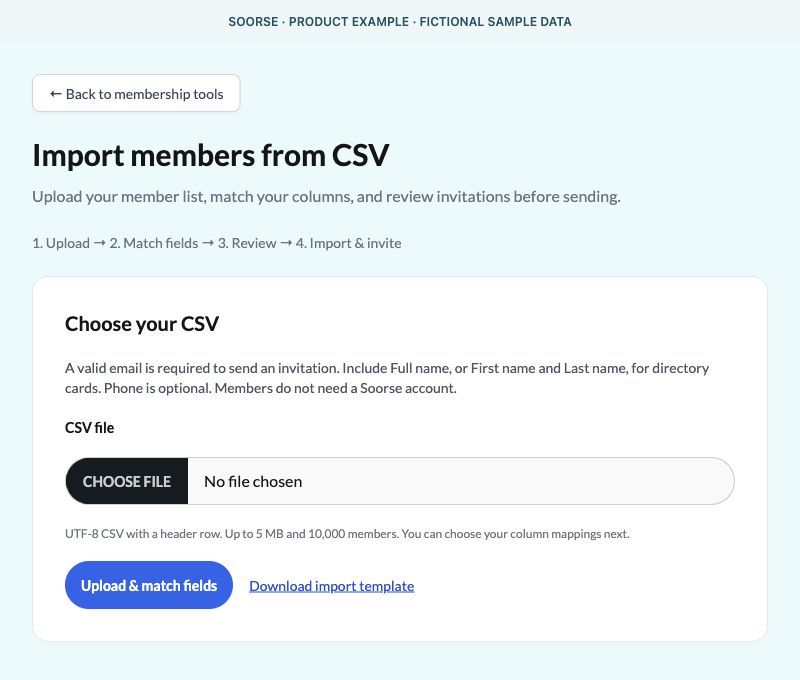
If you already keep alumni in a spreadsheet, export the list as a CSV. Open your group's membership tools and choose Import CSV, or follow Import members from CSV on the invitation page. The flow is Upload → Match fields → Review → Import & invite.
- Prepare the essentials. Include a valid email address and a full name, or separate first and last names. Phone is optional. Use the import screen's downloadable template if you need a starting point.
- Upload and match columns. Select the Soorse field that corresponds to each column. The member import accepts a UTF-8 CSV with a header row, up to 5 MB and 10,000 records.
- Review before sending. Check the ready-to-invite list and fix invalid or duplicate emails. Existing group members and people with pending invitations are skipped.
- Choose directory visibility for invitees. Review the Show invited members in directory checkbox. When enabled for that import, invited people can appear as name-only, nonclickable cards within the directory's existing access rules until they join.
- Approve Import & invite. Ready recipients enter the invitation process; Soorse's sender approval requirements still apply. They accept the invitation and complete their own accounts or join with an existing Soorse account.
Uploading a list does not create accounts for everyone or overwrite their existing profiles. School and class-year information belongs in each member's education profile; the current CSV member importer maps names, email, and optional phone.
Product screenshots below use fictional sample data to illustrate the controls.
3. Invite alumni by email, link, or QR code
Send a personal invitation
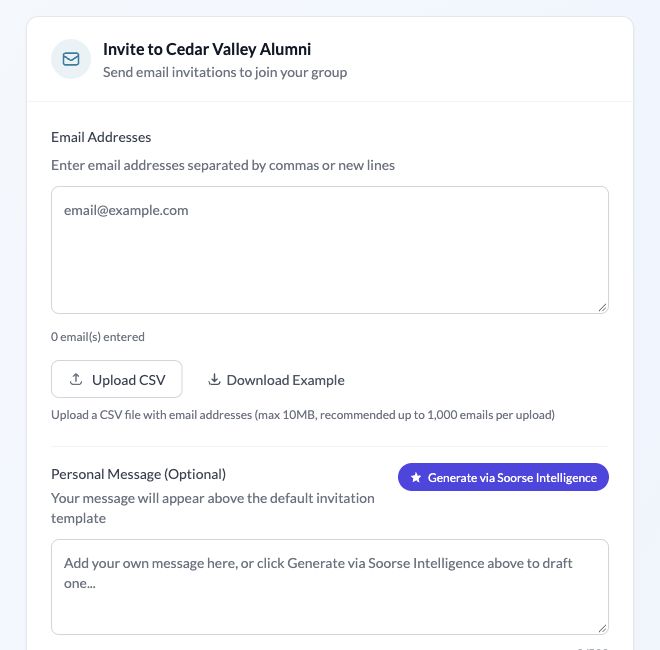
For a smaller group, open Invite and enter email addresses separated by commas or new lines. Add a short personal message explaining why you are launching the network and what alumni should do first. Generate via Soorse Intelligence can help draft that message for you to review.
Preview the email, choose whether to enable reminder emails, and send now or schedule for later. The invitation page displays scheduling times in Central Time. A simple first request works well: “Join, add your class year and what you do today, then find one classmate you would like to reconnect with.”
Make joining easy wherever alumni gather
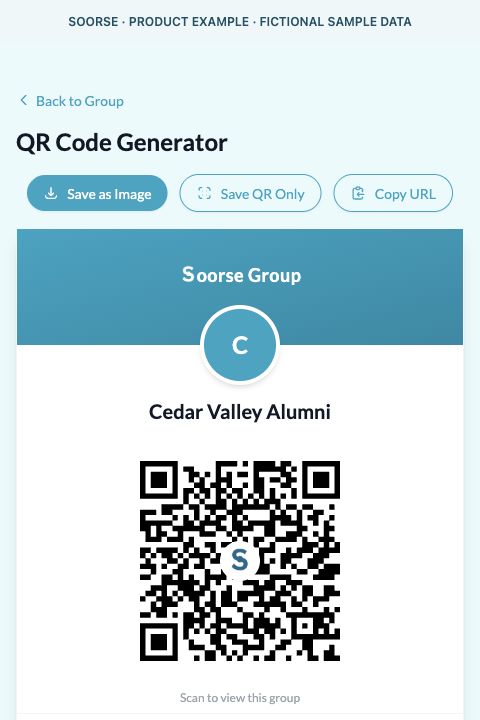
Open your group's sharing tools to find its QR Code Generator. Download the QR or copy the invitation URL for reunion signage, newsletters, alumni social channels, and your school's website. People scan or follow the link to enter the joining flow. Custom QR codes can have a short URL, expiration, or scan limit when you need a campaign-specific invitation.
For coordinated launch materials, open the Member Launch Kit from the invitation page. Choose your audience, goal, and tone; review the drafted message; then prepare your branded digital invitation, printable flyer, and social graphic. One clear invitation can carry across all three channels.
Explore the Member Launch Kit.
4. Let alumni help the network grow
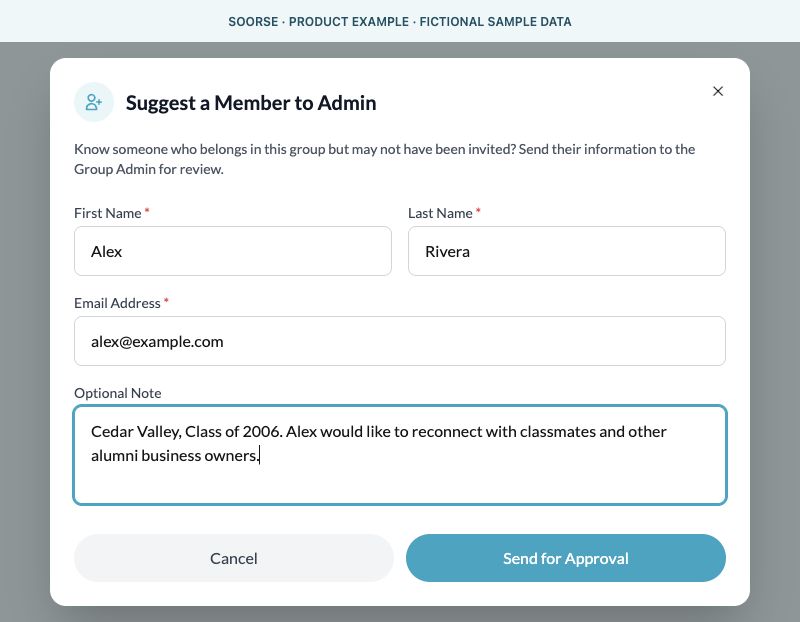
Your first alumni members know people the original mailing list may have missed. Encourage them to use Actions → Suggest a member in the group's directory to recommend a classmate who belongs in the community. They enter the person's name and email, with an optional note such as a class year or shared connection.
The suggestion goes to an admin for review. Admins can review the Suggestions tab in membership tools and approve an invitation or decline the suggestion. A recommendation does not automatically add someone to the group. Ask members to check that their classmate is comfortable being contacted.
This gives the network a natural way to expand: an alumnus joins, reconnects with someone, discovers a useful conversation or event, and recommends another classmate. Make that invitation part of your welcome post and reunion follow-up. Growth comes from members finding something worth sharing.
5. Connect events and the tools you already use
Give alumni a reason to come back: a reunion, a local meetup, a career conversation, or a school service day. You can create an event in Soorse or use the import options in Create Event to bring in an event you already manage elsewhere.
- Calendars: Google Calendar and Outlook Calendar offer import and sync workflows.
- Event and fundraising tools: The event menu includes Eventbrite, Givebutter, ChamberMaster, Humanitix, Bloomerang fundraising events, and OneCause. Available workflows vary by provider.
- Member data: Sync to CRM provides Monday.com and Airtable setup options. Configure the fields and membership rules that fit your organization; review an initial Airtable import before approving its invitations and membership management.
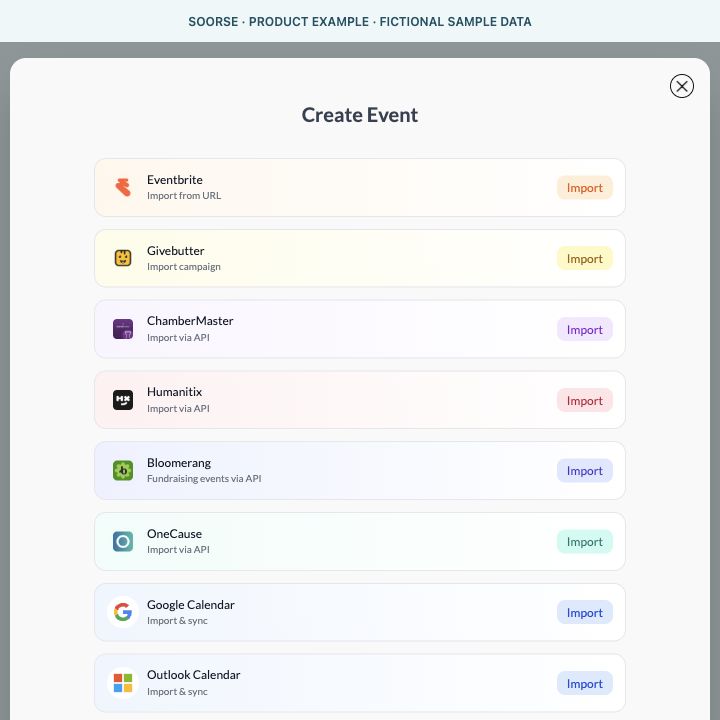
Connect the relevant account or API credentials, preview the records where the workflow provides a preview, and enable ongoing sync where supported. Check the imported event's date, time zone, visibility, and registration link before promoting it. You do not need to build your own API connection to use an existing connector; its setup may require access from the person who manages that account.
These connections can reduce repeat data entry. They are specific integrations with their own settings, rather than a promise that every field syncs both ways. For another school system or a custom workflow, ask about a custom integration.
6. Keep the conversation going with AI-assisted posts
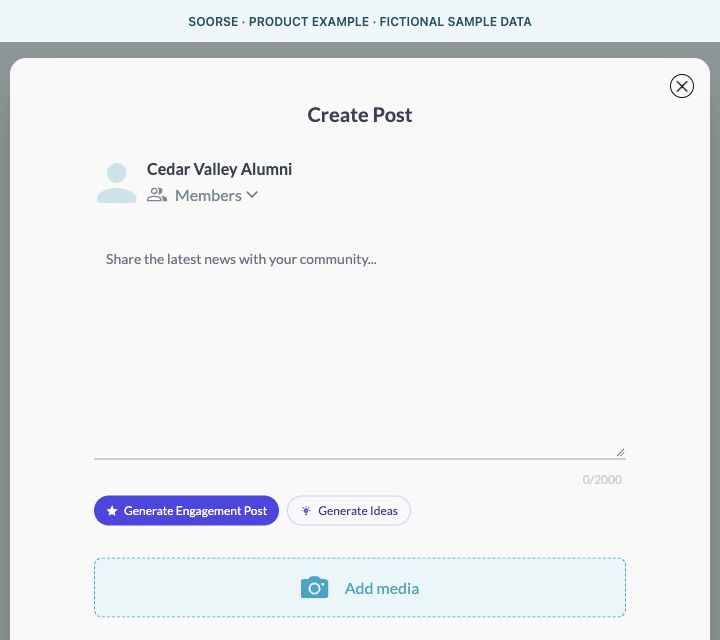
Open Create Post and use Generate Engagement Post for a starting draft, or Generate Ideas when you need a topic. Review the result, add your school's voice, and check names, dates, and details before publishing. You can also schedule a post for later.
Useful first posts can be simple:
- “Introduce yourself: class year, where you live, and what you are working on.”
- “What is one piece of advice you would offer this year's graduates?”
- “Alumni business owners: tell us what you do and how fellow graduates can find you.”
- “Coming to the reunion? Reconnect here before the event and keep in touch afterward.”
Pick a weekly admin check-in to review suggestions, welcome new members, check upcoming events, and prepare the next useful post. Member-managed profiles, invitation reminders, supported syncs, and AI drafts share the workload. An admin still supplies the judgment, welcome, and follow-through that make the community worth joining.
Soorse offers a free organization plan and free member access, with optional paid upgrades and usage limits on some features. Check current plans and limits when planning your launch.
Your alumni directory launch checklist
Save this list and work through it with your alumni committee.
Before inviting anyone
- Choose a clear purpose and the first class, chapter, or cohort.
- Add your group name, logo, description, and responsible admin.
- Review group access, profile visibility, and who may join.
- Clean your alumni list and use contact details you are authorized to use.
- Prepare a welcome post and one real upcoming event.
Launch day
- Upload, map, and review the CSV, or prepare individual email invitations.
- Choose whether invited-member placeholder cards should appear.
- Preview your invitation and review reminders before sending or scheduling.
- Test your own group invitation link and QR code before distributing them.
- Ask alumni to add their matching school, class year, and professional details.
- Invite each member to reconnect with someone and suggest a missing classmate.
The first week
- Review membership requests and alumni suggestions.
- Check connected event details and sync settings.
- Review, personalize, and publish an AI-assisted discussion post.
- Check invitations accepted, completed profiles, and member participation.
- Share an approved alumni story or public event highlight with the school community.
- Choose the next cohort to invite and set a recurring admin check-in.
Start with the people who are ready to reconnect
You can begin before every alumni record is perfect. Give a first group of graduates a welcoming place to find each other, a clear reason to join, and one useful next step. As classmates reconnect, share opportunities, and bring others into the conversation, the directory can become a lasting part of your school's community.
Bring your alumni network together
Create your alumni group and start with the list, invitations, and events you already have.
Create your free alumni groupExplore Soorse for alumni networks or compare five alumni platforms.
Screenshots show Soorse's product templates rendered with fictional sample data for this guide, reviewed November 12, 2026. They are illustrative product views, not a customer case study. Available controls depend on your role, group settings, and plan.